The casual amongst you can simulate 500 matches against your next opponent, then tweak your tactic and simulate again in order to get a sense of what the best approach is.
The sickos amongst you might want to start digging in to how the simulations actually work by tweaking tiny details iteratively to see what really counts.
Some experiments that have already been conducted:
- Do player partnerships translate to on-field performances? No. - Does a player's CA change his on-field performance (setting aside the attributes that might cause it)? No. - Does a player's height? No. - His age? Eh, maybe, but its minor. - Do your staff attributes matter when you use the Instant Result feature? No. - Is there an advantage to playing at home? Yes, calculated from your attendance.
Go forth and run your own tests, either to dispute these or investigate some facet of the game I've not even thought of.
I might do the same for FM 27 in the week it's available for free (but if I don't buy the full thing then it'll stop working the second they release the slew of patches and change the match engine).
This is an impressive effort! I have a couple of questions.
As far as I understand, the correct moment to run the tool and export the fixture is the briefing screen. Is it possible to assign opponent players to positions? I think not, according to this note: 'NOTE 2: AI/unknown control: assignments unmapped. Squad listed below; AI may replace this tactic.'
I go to the 'Simulation' tab, but I don't see any way to set the number of matches; I always end up with a single game. I saved the fixture, so it is a .json file. I then ran the PowerShell command and got the results, but isn't it kind of unintuitive to require PowerShell with magic commands when there is UI already? On top of it, as I've mentioned, this UI didn't let me generate more than a single game sim.
Another issue: I ran the sim N=100 4 times, and every single time I got the same result. What's going on? 100 runs: home 1 / draw 3 / away 96, avg 0.46-4.54
Taisho said: I go to the 'Simulation' tab, but I don't see any way to set the number of matches; I always end up with a single game. Expand Simulation > seed pattern
Enter '1-100' for 100 samples, '1-200' for 200 samples, etc.
I assume you can do '5200-5300' too
Taisho said: Another issue: I ran the sim N=100 4 times, and every single time I got the same result. What's going on? 100 runs: home 1 / draw 3 / away 96, avg 0.46-4.54 Expand That's the point I think, that it replicates the same result using the data used in the JSON file. My understanding is that when you click 'simulate fixture' it feeds the fixture data (either stored in temp, or loaded from your saved JSON file) into the match engine for an output.
Taisho said: is it possible to assign opponent players to positions? Expand
Nope. The CPU manager takes control of his team (as he would in the game) so forcing him to make certain decisions is outside the scope of this app.
Taisho said: isn't it kind of unintuitive to require PowerShell with magic commands when there is UI already? Expand
The app began as a command-line app, which I'd call via Powershell or good old Command Prompt. I left these features in because it's vital for running programmatic experiments (e.g. writing a Python script to change the JSON file somehow and then re-run the command, which you can't do via the UI).
Taisho said: Another issue: I ran the sim N=100 4 times, and every single time I got the same result. What's going on? Expand
That's not an issue, that's a feature. That's what pseudo-random number generator seeds do. From a given starting position, PRNG will also produce the same results. The seed is that starting position.
Thanks, worked great. I suggest showing an example seed pattern next to the input field, or filling the input field with, let's say, 1-100 by default.
I especially love how easy it is to see which player on your team is currently the strongest at a position. For example, I have a DC with 17 jumping, 14 acceleration, and 17 pace, and another one with 19 jumping but 13 acceleration and 13 pace. The practical aspect that can't be verified using any test league.
When you're about to start a match in FM24, you can see the opponent's formation, player positions, and roles.
Is there a way to import this information into the harness, or manually enter the formation, positions, and roles yourself? Expand
Do you mean the "Expected line-up" on the opposition report page? If so then I can't see that in the fixture report. I would presume that this is calculated for this screen by taking the manager's squad and his tendencies and figuring out what he's probably going to do. The data that's sent to the match engine doesn't contain any of that though; it doesn't even contain the starting 11. I imagine that this stuff is recalculated in the engine (probably using the same logic plus a bit of randomness) but it's something I can't know ahead of time. And, even if I could, I couldn't stop the engine from re-calculating it anyway and possibly changing it.
This is why I can't force starting XIs either; these are AI-controlled teams and they're going to make their own ad hoc choices.
On match day, you can see the opponent’s line-up and the roles assigned to each player.
I think it would be interesting to test which tactics work best against different opponents.
This doesn’t necessarily need to be an import feature. For example, it could allow you to manually enter the opponent’s formation, player positions, and roles, and then simulate matches to test which tactics are most effective against the opponent’s setup.
Of course, you can’t account for everything that happens during an actual match, but you could at least start the simulation with as much accurate pre-match data as possible. This would make it easier to analyse and compare tactics and get a better understanding of which approaches work best against different opposition setups.
As you can see in the screenshot, the Opposition Report shows the opponent’s formation and players. In my experience, these have always matched the line-up the opponent actually starts the match with.
GerardFM24 said: you could at least start the simulation with as much accurate pre-match data as possible. Expand
You actually can't. The expected line-up you're looking at isn't in the data that gets sent to the match engine. As I said, I imagine the AI manger generates this in the match. My app could read the game's UI and mimic the expected line-up visually but it's just a facade; it won't make the computer play the formation and would just be misleading in my opinion.
LightningFlik said: I can make the fields editable. What's happening when you try to set max familiarity? You need to highlight rows the, same as the other buttons. Expand "The selected player or tactic is missing tactical familiarity data (export the fixture again); no players were changed."
This probably also has something to do with it: It shows 'Home: Manchester City - [Tactic Name]' but then it says after that [Formation Unknown]
Oh, you can't change tactical familiarity for the opposition. That data doesn't exist in the fixture object. The fixture object--something I get from the game, remember--doesn't contain a tactic. It doesn't contain a formation. It doesn't even contain a starting eleven. No surprise there's no positional familiarity. I don't even know if the opposition use tactical familiarity.
LightningFlik said: Oh, you can't change tactical familiarity for the opposition. That data doesn't exist in the fixture object. The fixture object--something I get from the game, remember--doesn't contain a tactic. It doesn't contain a formation. It doesn't even contain a starting eleven. No surprise there's no positional familiarity. I don't even know if the opposition use tactical familiarity. Expand No, this is for the team I'm controlling
I created an app which lets you run FM 24 matches outside the game, using the game's actual code, in order to simulate what is going to happen.
GitHub link
Latest release
The casual amongst you can simulate 500 matches against your next opponent, then tweak your tactic and simulate again in order to get a sense of what the best approach is.
The sickos amongst you might want to start digging in to how the simulations actually work by tweaking tiny details iteratively to see what really counts.
Some experiments that have already been conducted:
- Do player partnerships translate to on-field performances? No.
- Does a player's CA change his on-field performance (setting aside the attributes that might cause it)? No.
- Does a player's height? No.
- His age? Eh, maybe, but its minor.
- Do your staff attributes matter when you use the Instant Result feature? No.
- Is there an advantage to playing at home? Yes, calculated from your attendance.
Go forth and run your own tests, either to dispute these or investigate some facet of the game I've not even thought of.
I might do the same for FM 27 in the week it's available for free (but if I don't buy the full thing then it'll stop working the second they release the slew of patches and change the match engine).
This is an impressive effort! I have a couple of questions.
As far as I understand, the correct moment to run the tool and export the fixture is the briefing screen. Is it possible to assign opponent players to positions? I think not, according to this note: 'NOTE 2: AI/unknown control: assignments unmapped. Squad listed below; AI may replace this tactic.'
I go to the 'Simulation' tab, but I don't see any way to set the number of matches; I always end up with a single game. I saved the fixture, so it is a .json file. I then ran the PowerShell command and got the results, but isn't it kind of unintuitive to require PowerShell with magic commands when there is UI already? On top of it, as I've mentioned, this UI didn't let me generate more than a single game sim.
Another issue: I ran the sim N=100 4 times, and every single time I got the same result. What's going on?
100 runs: home 1 / draw 3 / away 96, avg 0.46-4.54
Taisho said: I go to the 'Simulation' tab, but I don't see any way to set the number of matches; I always end up with a single game.
Simulation > seed pattern
Enter '1-100' for 100 samples, '1-200' for 200 samples, etc.
I assume you can do '5200-5300' too
Taisho said: Another issue: I ran the sim N=100 4 times, and every single time I got the same result. What's going on?
100 runs: home 1 / draw 3 / away 96, avg 0.46-4.54
That's the point I think, that it replicates the same result using the data used in the JSON file. My understanding is that when you click 'simulate fixture' it feeds the fixture data (either stored in temp, or loaded from your saved JSON file) into the match engine for an output.
Taisho said: is it possible to assign opponent players to positions?
Nope. The CPU manager takes control of his team (as he would in the game) so forcing him to make certain decisions is outside the scope of this app.
Taisho said: isn't it kind of unintuitive to require PowerShell with magic commands when there is UI already?
The app began as a command-line app, which I'd call via Powershell or good old Command Prompt. I left these features in because it's vital for running programmatic experiments (e.g. writing a Python script to change the JSON file somehow and then re-run the command, which you can't do via the UI).
Taisho said: Another issue: I ran the sim N=100 4 times, and every single time I got the same result. What's going on?
That's not an issue, that's a feature. That's what pseudo-random number generator seeds do. From a given starting position, PRNG will also produce the same results. The seed is that starting position.
Thanks, worked great. I suggest showing an example seed pattern next to the input field, or filling the input field with, let's say, 1-100 by default.
I especially love how easy it is to see which player on your team is currently the strongest at a position. For example, I have a DC with 17 jumping, 14 acceleration, and 17 pace, and another one with 19 jumping but 13 acceleration and 13 pace. The practical aspect that can't be verified using any test league.
Question about opponent formations and positions
When you're about to start a match in FM24, you can see the opponent's formation, player positions, and roles.
Is there a way to import this information into the harness, or manually enter the formation, positions, and roles yourself?
GerardFM24 said: Question about opponent formations and positions
When you're about to start a match in FM24, you can see the opponent's formation, player positions, and roles.
Is there a way to import this information into the harness, or manually enter the formation, positions, and roles yourself?
Do you mean the "Expected line-up" on the opposition report page? If so then I can't see that in the fixture report. I would presume that this is calculated for this screen by taking the manager's squad and his tendencies and figuring out what he's probably going to do. The data that's sent to the match engine doesn't contain any of that though; it doesn't even contain the starting 11. I imagine that this stuff is recalculated in the engine (probably using the same logic plus a bit of randomness) but it's something I can't know ahead of time. And, even if I could, I couldn't stop the engine from re-calculating it anyway and possibly changing it.
This is why I can't force starting XIs either; these are AI-controlled teams and they're going to make their own ad hoc choices.
On match day, you can see the opponent’s line-up and the roles assigned to each player.
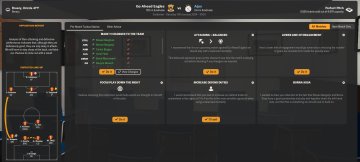
I think it would be interesting to test which tactics work best against different opponents.
This doesn’t necessarily need to be an import feature. For example, it could allow you to manually enter the opponent’s formation, player positions, and roles, and then simulate matches to test which tactics are most effective against the opponent’s setup.
Of course, you can’t account for everything that happens during an actual match, but you could at least start the simulation with as much accurate pre-match data as possible. This would make it easier to analyse and compare tactics and get a better understanding of which approaches work best against different opposition setups.
As you can see in the screenshot, the Opposition Report shows the opponent’s formation and players. In my experience, these have always matched the line-up the opponent actually starts the match with.
GerardFM24 said: you could at least start the simulation with as much accurate pre-match data as possible.
You actually can't. The expected line-up you're looking at isn't in the data that gets sent to the match engine. As I said, I imagine the AI manger generates this in the match. My app could read the game's UI and mimic the expected line-up visually but it's just a facade; it won't make the computer play the formation and would just be misleading in my opinion.
The 'max familiarity' option isn't working for me
It would be good to have the option to edit the morale/condition/sharpness values in the GUI rather than just option to set to max
GeorgeFloydOverdosed said: The 'max familiarity' option isn't working for me
It would be good to have the option to edit the morale/condition/sharpness values in the GUI rather than just option to set to max
I can make the fields editable. What's happening when you try to set max familiarity? You need to highlight rows the, same as the other buttons.
LightningFlik said: I can make the fields editable. What's happening when you try to set max familiarity? You need to highlight rows the, same as the other buttons.
"The selected player or tactic is missing tactical familiarity data (export the fixture again); no players were changed."
This probably also has something to do with it: It shows 'Home: Manchester City - [Tactic Name]' but then it says after that [Formation Unknown]
Oh, you can't change tactical familiarity for the opposition. That data doesn't exist in the fixture object. The fixture object--something I get from the game, remember--doesn't contain a tactic. It doesn't contain a formation. It doesn't even contain a starting eleven. No surprise there's no positional familiarity. I don't even know if the opposition use tactical familiarity.
LightningFlik said: Oh, you can't change tactical familiarity for the opposition. That data doesn't exist in the fixture object. The fixture object--something I get from the game, remember--doesn't contain a tactic. It doesn't contain a formation. It doesn't even contain a starting eleven. No surprise there's no positional familiarity. I don't even know if the opposition use tactical familiarity.
No, this is for the team I'm controlling
Oh bizarre. You could send me your save or I could dig in to it on my own.